Sellers
Manage an open stock position with live context, fast exits, and protective orders.
Manage a position without losing the context.
The Sellers view puts live price context, exit sizing, fast actions, and protective orders in one focused panel. Here is what each part of the stock workflow does.
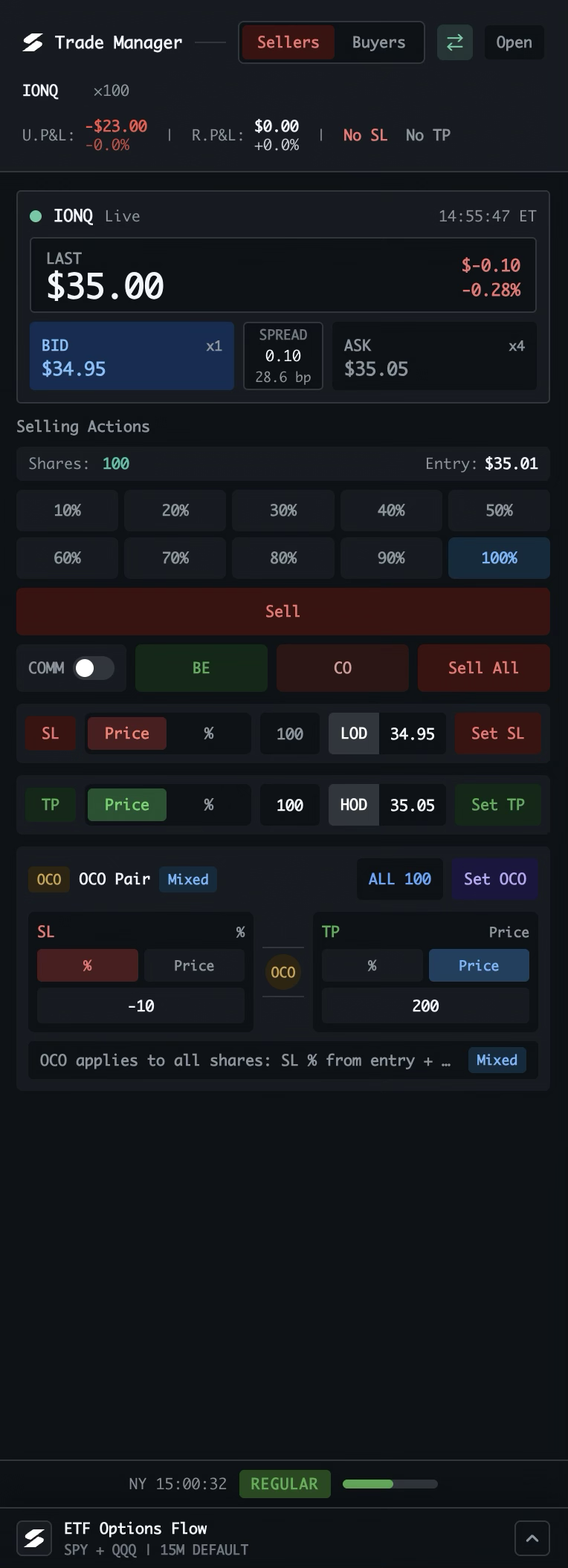
Pick how you want to work
Sellers is for managing open positions. Buyers switches to order setup. The instrument toggle selects stock or options mode, and Open pops the manager into its own window.
Read the position at a glance
Ticker, share count, unrealized and realized P&L, plus the current stop-loss and take-profit status stay visible above every action.
Use the live quote
Last price, change, bid, ask, size, and spread update in one compact strip. Click Bid to prefill a stop-loss price or Ask to prefill a take-profit price.
Choose the exit size
Select 10–100% of the position, review the share count and entry price, then use Sell to execute that portion at market.
Use the fast actions
BE moves the stop to breakeven. COMM includes estimated commission in that calculation. CO cancels open orders without closing the position. Sell All exits the full position.
Set a stop or target
For SL and TP, choose a share-price level or a percentage from entry. LOD and HOD can fill today’s low or high, then Set SL or Set TP submits the order. TP quantity can be adjusted.
Pair both sides with OCO
Set a stop loss and take profit together. Each leg can use a percentage or share price, and Set OCO applies the bracket to all shares. When one fills, the other cancels.
Stay aware of the session
The footer keeps the current time and market session visible, while ETF Options Flow remains available below the manager for broader market context.
Same workflow, different instrument. Options mode keeps the same Sellers / Buyers structure while adapting the controls to contracts, strikes, expiry, and premium-based protection.