Buyers
Build an options order from contract selection through premium-based attached protection.
Build an options order with the contract in view.
The options Buyers view brings contract selection, live premiums, order type, sizing, and attached protection into one focused entry workflow.
Choose the side and instrument
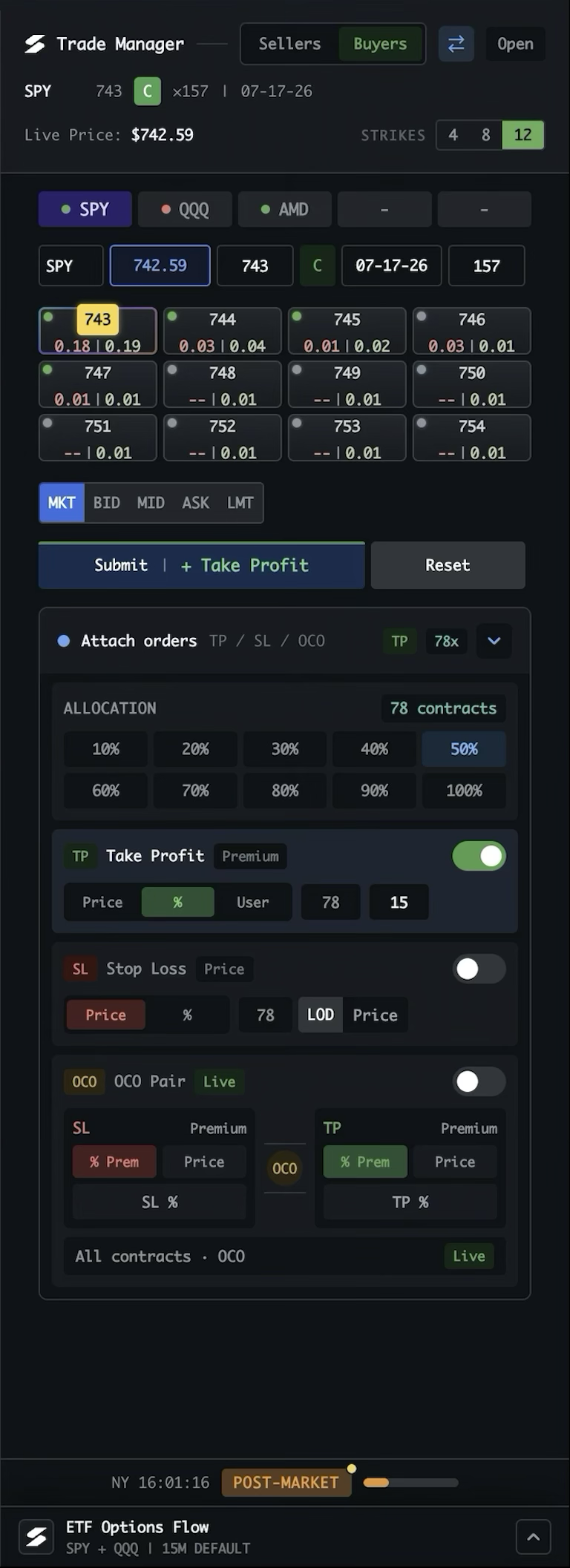
Buyers is for setting up a new options position. The instrument toggle keeps the manager in options mode, and Open moves it into a separate window when needed.
Keep contracts ready in tabs
Use each tab for a different contract setup. Once opened, its contract details stay live and fresh, so you can move between tabs without reloading data. Change the number of tabs from the sidebar settings.
See First steps for the sidebar settingsSet the contract details
Choose the ticker, live underlying price, strike, call or put, expiry, and quantity. The selected contract is carried into the order setup below.
Pick a strike from the chain
Use the strike buttons to control how many strikes are shown, then select a contract tile. Bid and ask premiums make the available market levels easy to compare.
Choose how to execute
Select MKT for immediate execution, or use BID, MID, ASK, or LMT when the order should reference a specific premium or limit price.
Submit the entry
Submit places the options order using the selected contract, quantity, order type, and premium. “+ Take Profit” keeps the target workflow attached to the entry; Reset clears the setup.
Allocate attached orders
Choose how many contracts receive protection using the percentage buttons or the contract count. The allocation is shown before TP, SL, or OCO is enabled.
Set a target
Enable Take Profit. Use Price for an underlying-price trigger, % for a percentage target based on option premium, or User for a saved multi-level strategy. The quantity and target values show what will be attached.
Add a stop loss
Enable Stop Loss and choose an underlying-price trigger or a percentage of premium. The stop remains separate until it is enabled and submitted with the order workflow.
Pair protection with OCO
Enable OCO to pair the stop loss and take profit for the allocated contracts. Each leg can use an underlying price or premium percentage; when one side fills, the other cancels.
Stay aware of the session
The footer keeps the current time and market session visible, while ETF Options Flow remains available below the manager for broader context.
Buyers opens the position; Sellers manages it afterward. Options mode keeps the same Trade Manager structure as stocks while adapting the workflow to contracts, strikes, expiry, and premium.