Data management
Import, export, restore, and intentionally clear stored trading data.
Keep your trading record portable and under control.
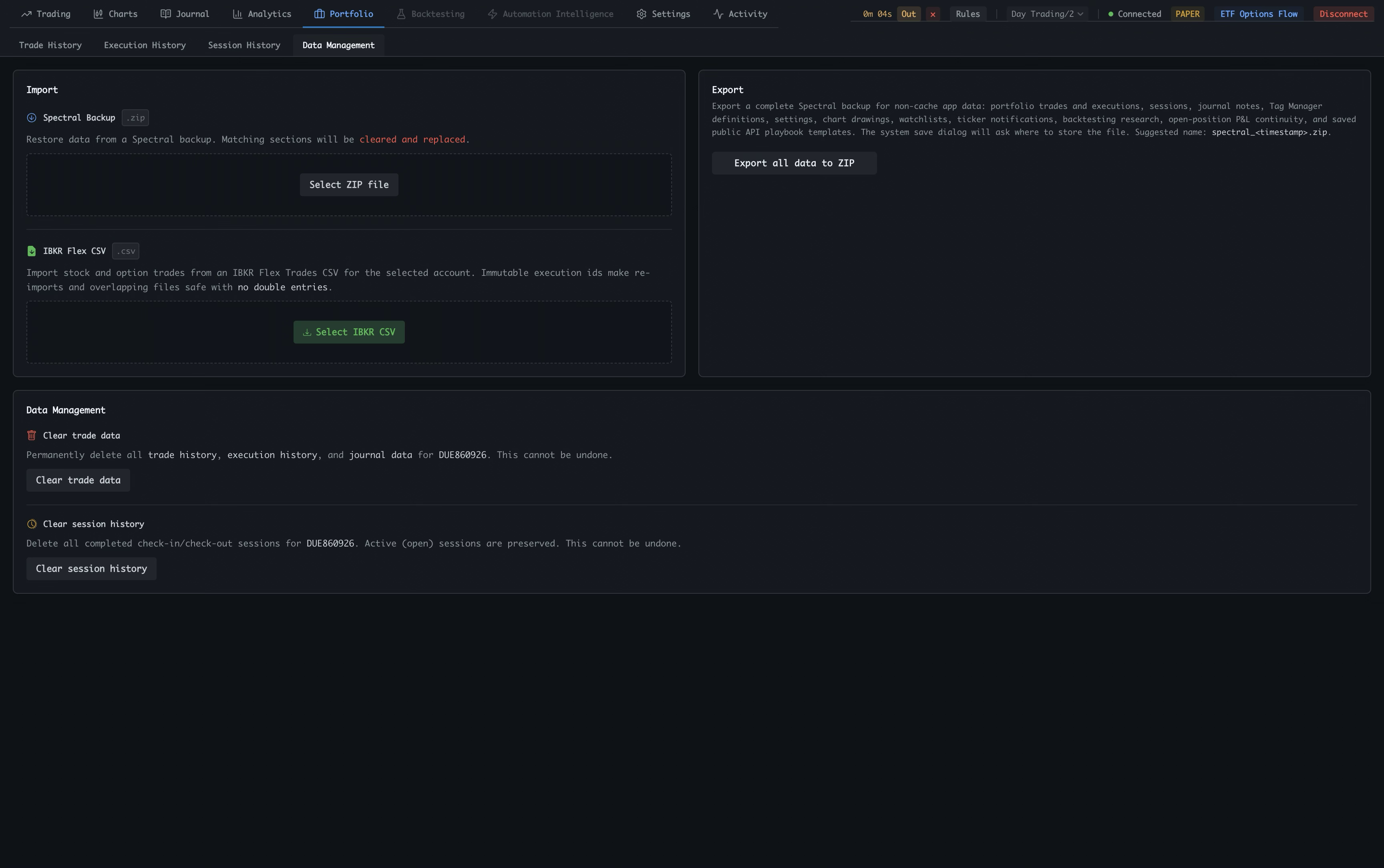
Data Management gives you a clear path to restore a Spectral backup, import IBKR Flex history, export your data, or intentionally clear stored records.
Switch to Data Management
Portfolio keeps the record views and data controls together while giving import and cleanup their own dedicated workspace.
Restore a Spectral backup
Select a ZIP backup to restore non-cache app data. Matching sections are cleared and replaced by the backup contents.
Import IBKR Flex history
Select an IBKR Flex Trades CSV to import stock and option trades for the selected account. Immutable execution IDs keep re-imports safe.
Export all data
Export a complete ZIP backup containing portfolio trades and executions, sessions, journal notes, tags, settings, drawings, watchlists, research, and other stored app data.
Understand the cleanup boundary
The Data Management section keeps permanent deletion separate from import and export so destructive actions are easy to recognize.
Clear trade data
This permanently deletes the selected account’s trade history, execution history, and journal data. It cannot be undone.
Clear session history
This removes completed check-in and check-out sessions while preserving active open sessions. It also cannot be undone.
Keep account state visible
The global header keeps the account, connection, paper or live mode, ETF Options Flow, and disconnect controls available while managing data.
IBKR Flex Query: bring your history into Spectral
A Flex Query is a reusable IBKR report template. Configure it once in Client Portal, export the trade history as a CSV, then import that file into Spectral to backfill the record from before you started using the app.
Create the query in IBKR
In IBKR Client Portal, open Reporting → Flex Queries and create an Activity or Trade Confirmation Flex Query.
Include the trade fields
Choose the Trades section and include the fields needed to identify each execution: account, symbol or contract, date and time, side, quantity, price, and commissions or fees.
Export a CSV
Run the query for the account and date range you want to bring over, then export the result as CSV. Spectral’s importer expects an IBKR Flex Trades CSV.
Import it in Spectral
Open Portfolio → Data Management, choose IBKR CSV, and select the exported file. The import adds the stock and option history to the selected account.
Use it as a backfill
Import history from before Spectral to unlock a longer record for Trade History, Execution History, Journal, and Analytics. Re-importing the same file is safe because immutable execution IDs prevent duplicate entries.
Flex-imported trades do not include MAE or MFE at Bid, Mid, or Ask. These fields require historical live premium prices to reconstruct the best and worst excursion during a trade. For options, those premium prices are only available while the contract is active, so the values cannot be recovered reliably after expiration.
Data controls deserve a clear boundary. Import and export preserve portability; cleanup actions are separated below and clearly marked because they cannot be undone.